Trading Strategies
What it is
Trading strategies are machine learning powered algorithms that analyze market data and generate buy and sell signals. Each strategy comes with historical performance data so you can evaluate it before committing. Only one strategy can be active for the trading bot at a time.
Where to find it
Open the Trading page. You will see two sections: Selected Strategy (your current active strategy) and Strategies (all available strategies to choose from). During first-time setup, the Quick Setup wizard on the Overview page also walks you through strategy selection.
How it works
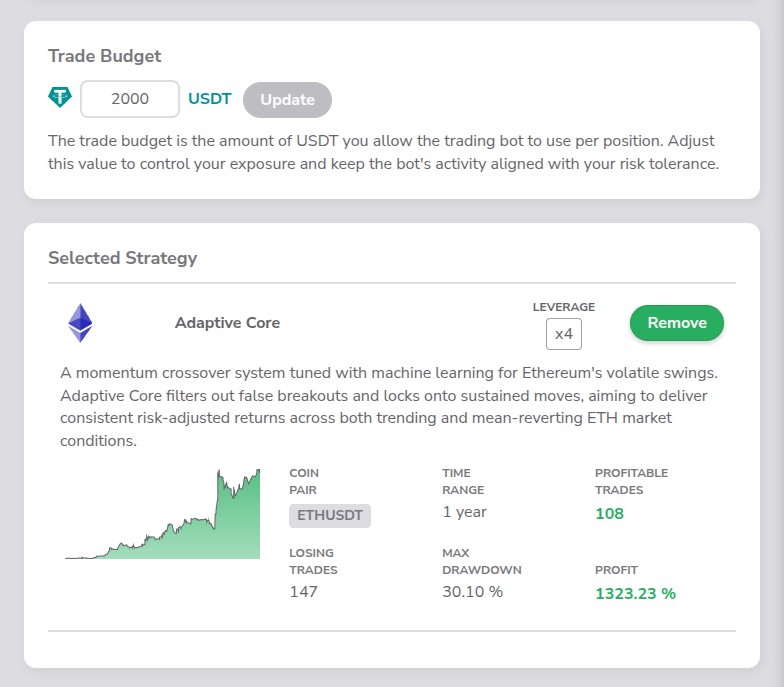
Each strategy card displays the strategy name, a description, and a profit chart showing historical performance. Below the chart you will find six performance metrics:
| Metric | Description |
|---|---|
| TIME RANGE | The period the backtest covers (currently "1 year") |
| LEVERAGE | The leverage multiplier used in the backtest (e.g. "x 5") |
| PROFITABLE TRADES | Total number of trades that ended in profit (shown in green) |
| LOSING TRADES | Total number of trades that ended in a loss |
| MAX DRAWDOWN | The largest peak-to-trough decline, shown as a percentage |
| PROFIT | Overall return for the backtest period, shown as a percentage in green |
To the right of the strategy name there is a LEVERAGE dropdown where you can choose your preferred leverage multiplier before selecting the strategy. Available leverage options are specific to each strategy.
- Click Select to make a strategy your active strategy.
- Once a strategy is active, it moves to the Selected Strategy section, where the leverage value is displayed as a fixed label (no longer a dropdown) and the button changes to Remove.
- Click Remove to deactivate the strategy.
Key details
- Only one strategy can be active at a time. Selecting a new one replaces the current one.
- The profit chart visualizes the strategy's historical cumulative returns.
- Max drawdown and profit values are displayed as percentages (e.g. "12.50 %").
 API keys encrypted at rest
 Trade-only permissions, no withdrawal access
 Practice risk-free with testnet mode